Understanding SameSite Cookies
A cookie is a chunk of data stored in the browser. It holds state and other information a website needs later.
SameSite cookies protect your data as you browse the web. They control how the information in your cookies can be used across different websites. Without that control, you're open to security vulnerabilities like cross-site request forgery (CSRF) attacks or cross-site scripting (XSS) attacks.
The difference between a site and an origin
Two URLs have the same origin if they share the exact scheme, domain name, and port.
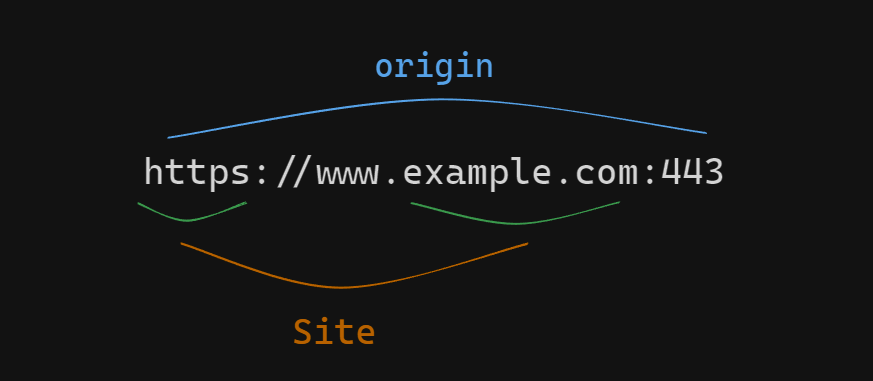
The term site is much broader: it accounts only for the scheme and the last part of the domain name. So a cross-origin request can be same-site, but not the other way around.
The public suffix list defines what pages count as the same site. It goes beyond top-level domains, so services like github.io make x.github.io and y.github.io count as separate sites.
What Are SameSite Cookies?
The SameSite attribute tells your browser when it's okay to share your cookie data with other websites. It has three values:
-
Strict: cookies with the
SameSiteattribute set to Strict will not be sent in cross-origin requests.- if a page on your site loads an image from a different domain, the cookie won't be sent with that request because it's cross-origin. This prevents potential security vulnerabilities.
-
Lax: cookies with the
SameSiteattribute set to Lax will be sent with cross-origin GET requests.- when you click a link on your page to a cross-origin page, the browser sends the cookie with the request because it's a cross-origin GET request.
-
None: This setting gives your cookies a passport to travel anywhere. They follow you to other websites, which can raise security concerns.
- When you interact with the page, like submitting a form, the browser sends the cookie with the request no matter the origin.
Browsers are restricting third-party cookies. If you've set SameSite=None on your cookies, you'll need to take extra action. Learn how to prepare for third-party cookie restrictions.
Quick Recap
-
Site vs Origin
- Origin includes scheme, domain, and port
- Site only considers scheme and domain
- Cross-origin requests can be same-site
- Public suffix list defines site boundaries
-
SameSite Cookie Types
- Strict: Most secure, no cross-origin requests
- Lax: Allows cross-origin GET requests
- None: Allows all cross-origin requests (requires Secure flag)
-
Security Considerations
- Third-party cookie restrictions are increasing
- Need to prepare for cookie deprecation
- Consider alternative authentication methods
- Implement proper security headers
References
- Web.dev - SameSite cookies explained
- MDN - SameSite Cookies
- Google - Prepare for third-party cookie restrictions
